KnowBe4 is my strongest overall pick for organizations that want AI-assisted phishing simulations, adaptive training, real-time coaching, and broad social-engineering coverage. Hoxhunt is the better choice for organizations prioritizing adaptive, threat-led training across email, SMS, Teams, and voice. Microsoft Defender’s Attack Simulation Training is the practical choice for Microsoft 365 shops that already own the required license.
The reason is simple: AI has made convincing social engineering cheaper and easier to personalize. Training therefore needs to move beyond annual phishing emails. The strongest platforms continuously test employees, adapt difficulty, teach immediately after risky behavior, and cover multiple attack channels. NIST’s Phish Scale also provides a useful way to measure how difficult a simulated phishing message is for humans to detect. [SOURCE: NIST, November 2023]
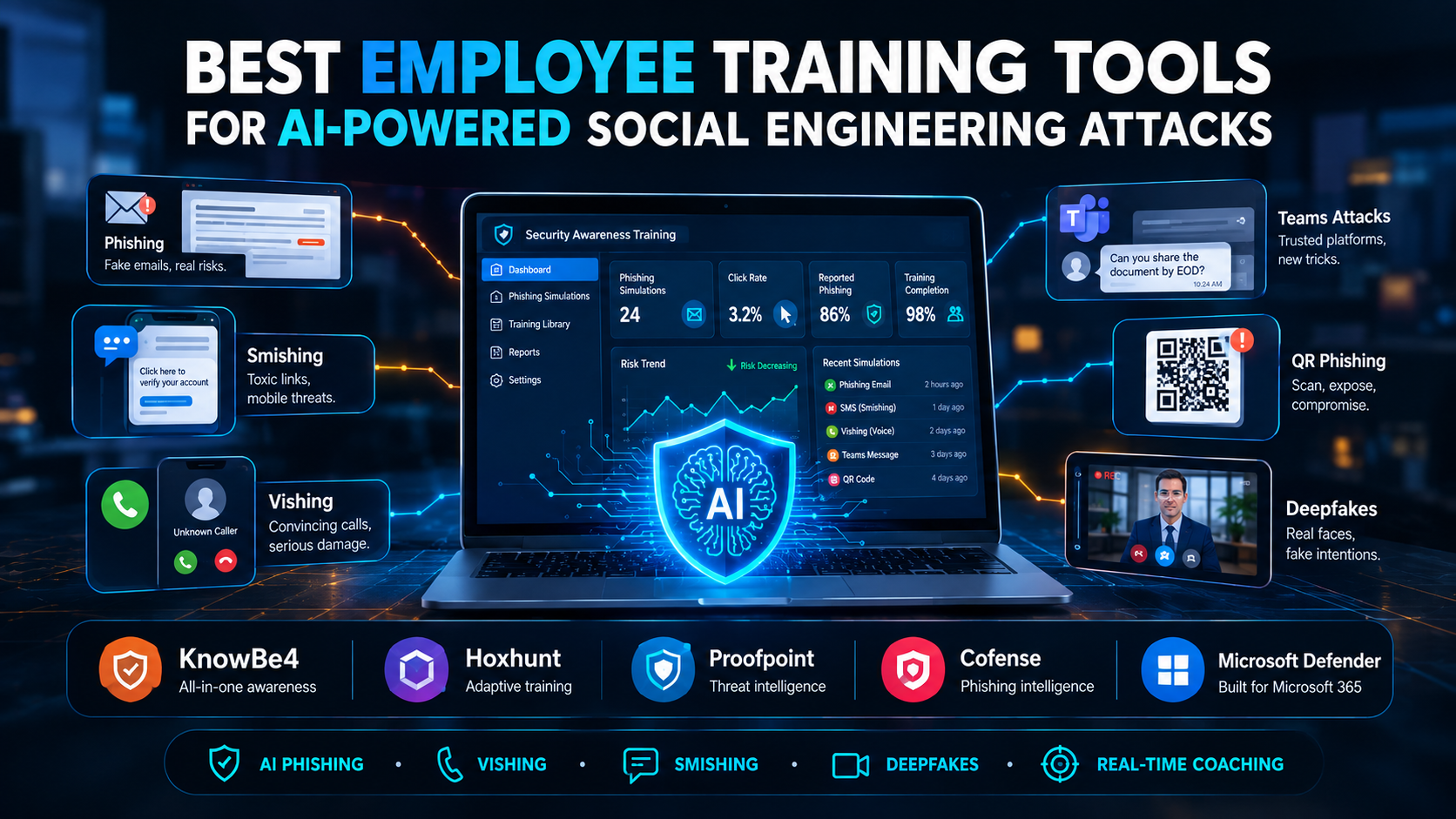
[IMAGE: Cybersecurity awareness platform showing an employee receiving an AI-generated phishing simulation, with email, SMS, voice, deepfake, and Teams attack channels]
The best tools are KnowBe4, Hoxhunt, Proofpoint, Cofense, and Microsoft Defender Attack Simulation Training. KnowBe4 leads for overall AI-native security awareness, Hoxhunt for adaptive human-risk training, Proofpoint for threat-intelligence-driven programs, Cofense for real phishing intelligence and reporting, and Microsoft for organizations already invested in Microsoft 365.
| Tool | Best for | AI/adaptive capability | Main strength |
|---|---|---|---|
| KnowBe4 | Overall choice | Strong | AI-generated simulations + real-time coaching |
| Hoxhunt | Adaptive training | Strong | Personalized multi-channel simulations |
| Proofpoint | Large enterprises | Strong | Threat intelligence + risk-based training |
| Cofense PhishMe | Phishing-focused teams | Moderate/strong | Real-world phishing intelligence |
| Microsoft Defender | Microsoft 365 organizations | Moderate | Built-in attack simulation |
The ranking is based on the capabilities documented by the vendors and NIST’s guidance on measuring phishing difficulty. I have not run a controlled head-to-head benchmark of these platforms, so I would not pretend that one has a scientifically measured “X% better” detection rate than another.
Why isn’t traditional security awareness training enough?
Annual training alone is too slow for AI-assisted social engineering. Modern attackers can personalize messages, imitate executives, generate convincing language, and move between email, messaging, phone, and video.
NIST specifically treats phishing as a human-centered problem and developed the Phish Scale to measure the human difficulty of detecting simulated phishing messages. NIST also warns that click rates alone do not provide a complete picture of phishing susceptibility. [SOURCE: NIST, 2023]
That changes what I would look for in a training platform.
A good system should answer four questions:
- Can it simulate the attacks employees actually face?
- Can it adapt training to individual behavior?
- Can it cover more than email?
- Can it measure whether behavior actually improves?
A platform that simply sends a monthly fake phishing email and produces a click-rate report is no longer enough for a serious human-risk program.
For most organizations, yes. KnowBe4 currently has the broadest combination of security-awareness content, AI-generated simulations, risk scoring, adaptive training, and real-time coaching. Its current AI-native SAT offering uses AI Defense Agents to automate personalized training and phishing simulations.
KnowBe4’s platform can generate and personalize phishing simulations based on user risk, role, and behavior. Its newer capabilities also extend into vishing and deepfake training.
The interesting part is Real-Time Coaching.
Instead of waiting until the end of a training campaign, KnowBe4 can provide a contextual SecurityTip when a risky action occurs. That creates a much tighter loop:
Risky action → explanation → reinforcement → another test
The company says its AI-native platform can reduce its Phish-Prone Percentage from an average 33.1% to 4.1% over 12 months. That’s a vendor-reported result, not an independent benchmark, so treat it as a marketing claim rather than a universal expected outcome. [VERIFY]
My verdict: Start with KnowBe4 if you want one platform covering most employee social-engineering training requirements.
Is Hoxhunt better than KnowBe4 for adaptive phishing training?
Hoxhunt is the better pick when continuous, individualized phishing practice is your priority. Its system adapts simulation difficulty, frequency, and attack type according to employee behavior, role, and skill.
Hoxhunt currently supports simulations involving email, smishing, vishing, callback attacks, Microsoft Teams, and deepfake video. Its Agentic Reasoning Engine uses live threat signals and employee context to choose simulations.
That’s a major advantage against AI-powered social engineering.
Imagine an employee in finance repeatedly clicking invoice-themed simulations. Instead of putting that person back into the same generic annual course, an adaptive platform can increase the frequency and change the scenario.
Hoxhunt also emphasizes short, frequent training rather than large annual courses. Its security-awareness product supports personalized learning paths and localization across 40+ languages.
My verdict: Choose Hoxhunt if you want training to behave more like continuous security practice than a compliance course.
[IMAGE: Hoxhunt-style adaptive training flow showing different employees receiving personalized phishing, smishing, vishing, and Teams simulations]
Proofpoint is particularly strong for large organizations that want training connected to real threat intelligence and user-risk data.
Its Security Awareness Training platform can identify vulnerable users, assign targeted training, and use real-world threat intelligence to create simulations. Proofpoint also supports simulated phishing, SMS, USB attacks, assessments, and adaptive learning.
Its newer ThreatFlip workflow is especially relevant to AI-era training. Proofpoint says ThreatFlip can take a real phishing email and use AI to transform it into a safe phishing simulation while identifying social-engineering cues based on the NIST Phish Scale. [SOURCE: Proofpoint, February 2026]
That SOC-to-training connection is valuable.
A real attack happens.
The SOC investigates it.
The training team turns the attack into a safe simulation.
Employees then practice against the same type of lure.
That is far more useful than choosing random phishing templates from a library.
My verdict: Proofpoint is one of my top choices for enterprises already using its email-security ecosystem.
Is Cofense PhishMe good for employee phishing training?
Cofense PhishMe is an excellent choice when phishing detection and reporting are the center of your employee-security program.
Cofense says its training uses real phishing data for adaptive simulations and supports scenarios including phishing, smishing, vishing, and QR-code phishing. Its Reporter functionality also helps employees report suspicious messages quickly.
That reporting loop matters.
Training should teach employees not only:
“Don’t click.”
It should teach:
“Recognize it, report it, and help the security team remove it.”
Cofense has also integrated machine learning into PhishMe and says its threat-ingest system processes large volumes of reported phishing data. Those figures are vendor-provided and should be treated accordingly. [VERIFY]
My verdict: Pick Cofense when your organization wants a strong phishing-reporting culture backed by real-world threat intelligence.
Yes. Microsoft Defender for Office 365 includes Attack Simulation Training, making it a practical choice for organizations already standardized on Microsoft 365.
The feature is available with Microsoft 365 E5 or Microsoft Defender for Office 365 Plan 2. Microsoft supports simulated phishing attacks, training campaigns, payloads, landing pages, QR-code simulations, reporting, and automated simulations.
The current workflow is:
Microsoft Defender portal → Email & collaboration → Attack simulation training → Simulations → Launch a simulation
You can choose the social-engineering technique, select the payload, target users, assign training, configure notifications, and schedule the simulation.
That makes Defender a very attractive option when you already pay for the appropriate Microsoft license.
You may not need to buy another phishing simulator just to run basic employee testing.
My verdict: Use Microsoft first if your organization already has Defender for Office 365 Plan 2 or Microsoft 365 E5. Compare specialist platforms if you need deeper adaptive training, broader human-risk analytics, or richer multi-channel simulations.
[IMAGE: Microsoft Defender portal showing Attack Simulation Training with phishing simulation, targeted users, training assignment, and reporting]
Prioritize adaptive simulations, multi-channel attack scenarios, behavioral analytics, immediate coaching, and threat intelligence—not just a large training-video library.
I would evaluate these capabilities:
AI-generated phishing simulations
The platform should be able to generate realistic scenarios without requiring administrators to manually write hundreds of emails.
But AI generation should have guardrails. Simulations must remain non-malicious and controlled.
Adaptive difficulty
If everyone receives the same phishing test, you are measuring general awareness—not individual resilience.
The platform should change scenarios based on previous performance.
Multi-channel simulation
Email is only one channel.
Look for:
- Phishing
- Smishing
- Vishing
- QR phishing
- Business email compromise
- Executive impersonation
- Microsoft Teams attacks
- Deepfake scenarios
- Callback scams
Hoxhunt and Cofense already document several of these channels.
Real-time coaching
A failed simulation should immediately become a learning opportunity.
KnowBe4’s Real-Time Coaching is designed around this exact model.
Risk-based reporting
Do not measure only:
“How many people completed training?”
Measure:
- Simulation failure rate
- Reporting rate
- Time to report
- Repeat failures
- Risk by department
- Risk by role
- Improvement over time
- Difficulty of simulations
NIST’s Phish Scale is useful here because it adds difficulty context to phishing exercise results.
How should you test employee training software before buying it?
Run a controlled pilot instead of accepting a sales demo as proof.
I recommend testing 25–50 employees across different departments, especially finance, HR, executives, IT, and customer support.
Run at least four scenarios:
- AI-written executive impersonation
- Invoice or payment BEC
- QR-code phishing
- Callback/vishing scenario
Then measure:
- Who clicked?
- Who reported?
- How quickly did they report?
- Who repeated the mistake?
- Did targeted training improve their next result?
- Could the platform automatically assign remediation?
- Could administrators see the trend?
For phishing difficulty, apply the NIST Phish Scale rather than comparing raw click rates from completely different campaigns. NIST specifically designed the scale to provide context around the human difficulty of simulated phishing messages.
I have not performed a controlled benchmark across KnowBe4, Hoxhunt, Proofpoint, Cofense, and Microsoft, so I am deliberately not giving them invented scores for detection accuracy or behavior improvement.
That’s the right way to approach a security product comparison.
Use continuous, short exercises instead of relying on one annual course. The exact cadence should depend on employee risk, organizational tolerance, and the type of attacks being simulated.
A practical starting program is:
- Monthly micro-learning
- Monthly or biweekly phishing simulations for higher-risk groups
- Quarterly vishing/smishing/QR exercises
- Immediate coaching after failures
- Additional training after repeated failures
- Executive-focused impersonation exercises
- Annual full security-awareness review
Do not punish employees for failing simulations.
The goal is to create people who report suspicious behavior quickly—not employees who become afraid of clicking anything.
Employees need to recognize manipulation patterns, not simply memorize what a phishing email looks like.
Teach them to slow down when a message creates:
- Urgency
- Fear
- Authority pressure
- Secrecy
- Financial pressure
- Unexpected requests
- Password-reset demands
- Changes to payment instructions
- Requests to bypass normal procedures
AI makes grammar and spelling weaker indicators than they once were.
A perfectly written email can still be malicious.
An employee should verify the request, the identity, and the communication channel.
For example, if a supposed CEO asks an employee to purchase gift cards, the correct response is not “Does the email look professional?”
The correct response is:
“Can I independently verify that this person actually made this request?”
What are the biggest mistakes companies make with employee security training?
The biggest mistake is measuring course completion instead of measuring behavior.
A 100% completion rate does not prove that employees can recognize an AI-generated attack.
Other common mistakes include:
- Sending identical simulations to everyone
- Testing only email
- Ignoring executives and privileged users
- Never testing vishing
- Never testing QR phishing
- Using obviously fake messages
- Punishing employees for mistakes
- Ignoring repeat offenders
- Measuring clicks without measuring difficulty
- Running one campaign per year
- Failing to connect training results with SOC data
A mature program should connect training → simulation → user behavior → reporting → remediation → retesting.
That is the loop that produces measurable improvement.
Which employee training tool should you choose?
Choose KnowBe4 for the best overall AI-native platform, Hoxhunt for adaptive multi-channel training, Proofpoint for enterprise threat-intelligence integration, Cofense for phishing-centric programs, and Microsoft Defender when your organization already has the right Microsoft 365 licensing.
My shortlist would look like this:
Best overall: KnowBe4
Best adaptive training: Hoxhunt
Best enterprise threat intelligence: Proofpoint
Best phishing-focused program: Cofense
Best for Microsoft 365 shops: Microsoft Defender Attack Simulation Training
Don’t choose based on the number of training videos.
Choose based on how closely the platform can reproduce the attacks your employees are actually likely to face.
What is the best employee training tool for AI-powered phishing?
KnowBe4 is the strongest overall choice because its current platform combines AI-generated attack simulations, personalized training, risk scoring, and real-time coaching. Hoxhunt is a strong alternative when adaptive, multi-channel simulations are the priority. Microsoft Defender is attractive for organizations already licensed for Microsoft 365 E5 or Defender for Office 365 Plan 2.
How can employees be trained against AI-generated phishing attacks?
Use realistic simulations followed by immediate, targeted coaching. Employees should practice recognizing urgency, authority impersonation, unusual requests, payment changes, credential requests, and other manipulation cues. NIST recommends contextualizing phishing results with its Phish Scale rather than relying only on raw click rates.
Can AI-powered training simulate deepfake and voice attacks?
Yes. Modern platforms increasingly extend beyond email. KnowBe4 documents AI-assisted vishing and deepfake training, while Hoxhunt supports vishing, callback, Teams, and deepfake-video scenarios. Cofense also provides vishing simulations. Availability and exact functionality depend on the product tier, so verify the current package before purchasing. [VERIFY]
Is Microsoft Defender Attack Simulation Training enough?
For many Microsoft 365 organizations, it can be enough for basic-to-advanced phishing simulation and training. It supports simulated attacks, training campaigns, QR-code exercises, reporting, and automated simulations. However, organizations wanting extensive adaptive human-risk management or broader multi-channel training should compare Defender with dedicated platforms such as KnowBe4 or Hoxhunt.
How often should companies run phishing simulations?
Run them continuously rather than relying on an annual test. Monthly simulations are a reasonable starting point, with more frequent exercises for high-risk users and additional training after failures. Vary the attack type and difficulty so employees learn to recognize manipulation rather than memorize one particular phishing format.
What should companies measure after security awareness training?
Measure reporting rate, time to report, repeat failures, behavior by department and role, and improvement over multiple simulations. Raw click rate is useful but incomplete. NIST’s Phish Scale provides a way to account for the human difficulty of different phishing messages when interpreting simulation results.
Related reading: cyber security quiz questions and answers PDF.
Final verdict
AI has changed the economics of social engineering. Attackers can personalize messages faster, imitate trusted people more convincingly, and move between email, messaging, voice, and video.
Your training program needs to respond in the same direction.
My recommendation: start by piloting KnowBe4 and Hoxhunt, then compare Microsoft Defender if you already have Microsoft 365 E5 or Defender for Office 365 Plan 2. Use the same employee groups, attack scenarios, and measurement criteria during the pilot.
The winner should be the platform that produces better reporting and behavior change—not the platform with the longest course catalog.