Search intent: Commercial investigation + comparison. The reader wants to know which MDM platform gives the strongest practical control over both Android and iOS devices, and where each operating system changes what an administrator can actually enforce.
Core question: Which MDM software provides the best device control across Android and iOS, and how different are the controls between the two platforms?
People Also Ask-style questions:
- What is the best MDM for Android and iOS?
- Is Android or iOS easier to manage with MDM?
- What can an MDM administrator control on Android vs iPhone?
- Is Microsoft Intune better than ManageEngine for mobile device management?
- Can MDM remotely lock, wipe, restrict, and manage apps on Android and iOS?
What is the best MDM software for Android versus iOS device control?
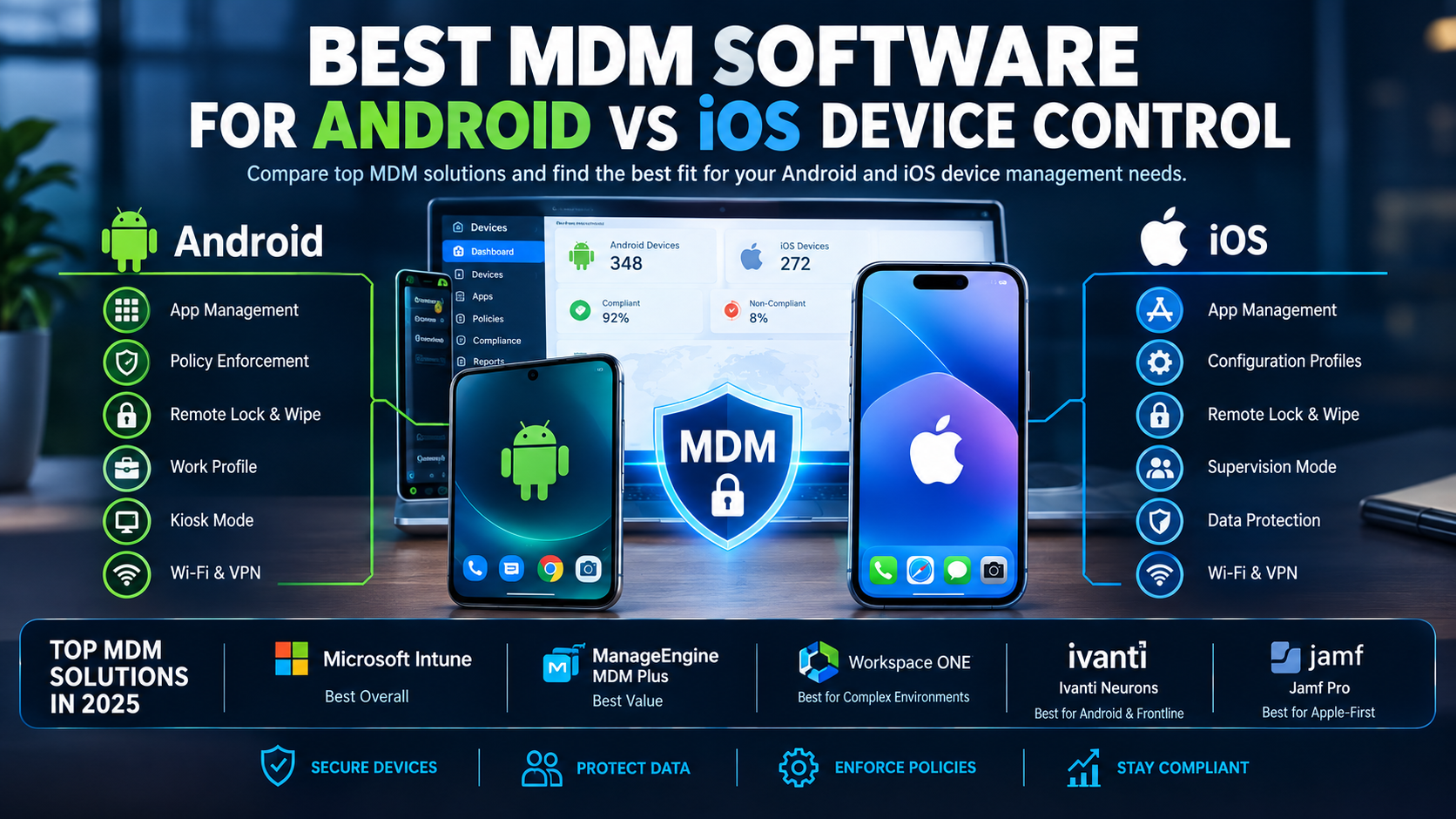
Microsoft Intune is my best overall choice for organizations managing both Android and iOS. It gives administrators strong Android Enterprise controls, iOS/iPadOS management, app protection, compliance policies, Conditional Access, and integration with Microsoft Entra and Defender. ManageEngine Mobile Device Manager Plus is the better value-oriented alternative, while Jamf Pro is the stronger specialist choice when the fleet is overwhelmingly Apple.
The bigger issue is not simply which MDM has the longest feature list. Android and iOS expose different management capabilities to MDM platforms. Android Enterprise offers management modes such as work profiles, fully managed devices, and dedicated/kiosk devices. Apple relies heavily on Apple’s MDM framework, supervision, Automated Device Enrollment, and increasingly Declarative Device Management.
NIST’s current mobile-device guidance specifically covers centralized device management, endpoint protection, corporate-owned devices, and BYOD deployments. [SOURCE: NIST SP 800-124 Rev. 2, May 2023]
[IMAGE: Android phone and iPhone side-by-side with an MDM dashboard showing different device-control policies]
How different are Android and iOS device controls?
Android generally gives MDM administrators more granular device-control options, especially for corporate-owned and kiosk devices. iOS offers strong security and configuration controls but deliberately limits certain administrator actions.
That’s why an MDM comparison should never simply say that a product “supports Android and iOS.”
For example, Microsoft Intune currently supports Android Enterprise modes including work profile, fully managed, and dedicated devices. Depending on the enrollment type, administrators can control applications, screen capture, factory reset behavior, copy/paste, passwords, VPN, Wi-Fi, and kiosk functionality.
Apple takes a different approach. With supervised and Automated Device Enrollment devices, organizations can apply extensive restrictions and configurations. Apple’s newer Declarative Device Management model also lets devices independently maintain configurations based on defined conditions.
Android vs iOS MDM control at a glance
| Control | Android Enterprise | iOS/iPadOS |
|---|---|---|
| Remote lock | Yes | Yes |
| Remote wipe | Yes | Yes |
| App deployment | Strong | Strong |
| Work/personal separation | Work Profile | User Enrollment / managed apps |
| Kiosk mode | Strong | Available through supervised management |
| Hardware restrictions | Broad, OEM-dependent | Strong but Apple-defined |
| Screen capture control | Available | Available through supported restrictions |
| OS update management | Manufacturer-dependent | Strong Apple-managed model |
| Zero-touch deployment | Android Zero-touch | Apple Automated Device Enrollment |
| OEM-specific controls | Samsung/Zebra and others | Limited because Apple controls hardware/software |
| Deep device-owner control | Strong | More restrictive |
The exact capabilities depend on OS version, enrollment type, hardware manufacturer, and the MDM platform.
Why is Microsoft Intune the best overall MDM for Android and iOS?
Intune wins when you need one management platform for Android, iPhone, iPad, apps, compliance, identity, and endpoint security. Its biggest advantage is the connection between MDM and the Microsoft security stack.
For Android, Microsoft recommends Android Enterprise rather than the older Android Device Administrator model. Intune supports work profiles for BYOD as well as fully managed and dedicated devices for corporate deployments.
For iOS/iPadOS, Intune supports device enrollment, configuration profiles, app management, compliance policies, and app protection. It can also manage corporate data without requiring full device enrollment in certain application-management scenarios.
A particularly useful combination is:
Intune → device compliance → Microsoft Entra Conditional Access → Microsoft Defender
That lets an organization prevent a risky or noncompliant mobile device from accessing corporate resources. Microsoft’s current documentation supports this workflow for Android and iOS/iPadOS.
What Intune controls particularly well
- Device restrictions
- Required and optional applications
- Work profiles
- Corporate-owned Android devices
- iOS/iPadOS configuration
- Compliance policies
- Conditional Access
- Microsoft Defender integration
- Wi-Fi and VPN configuration
- Certificates
- Kiosk/dedicated Android devices
- Corporate data protection
[IMAGE: Microsoft Intune admin center showing Android Enterprise and iOS/iPadOS configuration policies]
One useful current compatibility datapoint: Microsoft says Intune supports the three most recent major Apple OS versions, while iOS/iPadOS app protection requires version 17 or later; user-based Android management supports Android 10 and later. [SOURCE: Microsoft Intune, 2026]
That matters when you’re buying an MDM for a mixed fleet. Don’t evaluate only today’s devices. Check the minimum OS versions your employees actually use.
Is ManageEngine better than Intune for Android and iOS?
ManageEngine Mobile Device Manager Plus is my pick for organizations that want broad Android/iOS management without building their entire endpoint-security stack around Microsoft.
It supports Android, iOS/iPadOS, macOS, Windows, Chrome OS, tvOS, and other device categories from a unified console. It also supports corporate-owned and BYOD scenarios.
ManageEngine is particularly attractive when you need traditional MDM functions:
- Device enrollment
- Configuration profiles
- Application deployment
- Device restrictions
- Kiosk mode
- Remote troubleshooting
- Asset inventory
- Corporate-data wipe
- Wi-Fi/VPN configuration
- Apple Business Manager enrollment
- Android Zero-touch enrollment
- Samsung Knox enrollment
Its current documentation also shows separate profile management for Android and iOS/iPadOS, which reflects an important reality: cross-platform MDM still requires platform-specific policies.
I would choose ManageEngine over Intune when the organization doesn’t depend heavily on Microsoft Entra, Defender, Microsoft 365, and Conditional Access.
Is Workspace ONE still a strong Android vs iOS MDM?
Yes. Omnissa Workspace ONE UEM remains a serious choice for large heterogeneous environments where mobile management is part of a wider UEM strategy.
Workspace ONE is explicitly designed to manage mobile devices across Android and iOS and provides enrollment, policy assignment, application deployment, and fleet monitoring.
It makes the most sense when you have a complex environment containing:
- Android phones
- iPhones and iPads
- Rugged devices
- Shared devices
- Frontline workers
- Multiple operating systems
- Existing UEM infrastructure
For a small company with 50 phones, I wouldn’t start with Workspace ONE unless there is a specific reason. Its strengths become more compelling as the environment becomes operationally complex.
Is Jamf Pro good for Android and iOS management?
Jamf Pro is excellent for Apple management but is not my recommendation for an Android-versus-iOS mixed fleet.
Jamf’s current product positioning is explicitly centered on Apple device management. It provides zero-touch deployment, Apple configuration management, application lifecycle management, inventory, security controls, and Declarative Device Management capabilities for Apple devices.
If your company runs:
- iPhones
- iPads
- Macs
- Apple TVs
- Apple-focused workflows
then Jamf Pro deserves serious consideration.
But if your requirement is deep control over both Android and iOS, choose Intune, ManageEngine, Workspace ONE, or Ivanti instead.
[IMAGE: Apple-focused Jamf Pro dashboard compared with Android Enterprise management]
When should you choose Ivanti Neurons for MDM?
Ivanti is especially interesting for organizations with Android-heavy, frontline, rugged, or security-sensitive deployments.
Ivanti supports iOS and Android and combines device management with mobile threat-defense capabilities. Its Android offering supports devices such as Samsung, Pixel, and Zebra, along with Android Enterprise deployment methods including Zero-touch.
That makes it particularly useful for warehouses, logistics operations, healthcare environments, retail, and field workers.
Ivanti can also combine MDM with mobile threat defense, allowing organizations to evaluate device, network, and application threats rather than treating MDM as nothing more than a configuration tool.
What can an MDM administrator actually control?
An MDM can typically enforce security settings, deploy applications, configure networks, check compliance, lock or wipe devices, and separate corporate data from personal data. The exact controls depend heavily on Android enrollment mode and Apple’s management model.
For example, in Intune, an administrator can create a device restriction profile from:
Devices → Manage devices → Configuration → Create → New policy → select platform → Device restrictions
Microsoft documents controls such as camera restrictions, app-store access, password requirements, data-sharing restrictions, and other device features for supported platforms.
For compliance:
Devices → Compliance → Policies → Create policy
You can create separate Android Enterprise and iOS/iPadOS compliance policies and use the results to control access to corporate resources.
For Android Enterprise update management, Intune provides settings for automatic installation, maintenance windows, postponement, and freeze periods.
This is where MDM becomes a security control rather than just an inventory database.
How should you test an MDM before buying it?
Don’t judge an MDM from a feature checklist alone. Run a small proof of concept using one Android Enterprise device and one supervised iPhone or iPad.
I recommend this 10-test pilot:
- Enroll one corporate Android device using Android Enterprise.
- Enroll one corporate iPhone using Apple Business Manager/Automated Device Enrollment.
- Push a required application to both.
- Block the camera on both where supported.
- Configure corporate Wi-Fi.
- Apply a minimum OS version.
- Test remote lock.
- Test corporate-data wipe versus full device wipe.
- Test a noncompliant device accessing Microsoft 365 or another protected resource.
- Remove the device from management and verify what corporate data remains.
The last test is easy to skip and extremely valuable.
For BYOD, test privacy separately. You want to verify that removing the work profile or corporate management does not unexpectedly delete personal photos, messages, or personal applications.
NIST recommends considering security throughout the mobile-device lifecycle, including deployment, use, and disposal. [SOURCE: NIST SP 800-124 Rev. 2, 2023]
[IMAGE: MDM proof-of-concept checklist showing Android and iPhone enrollment, policy enforcement, remote wipe, and compliance testing]
Which MDM should you choose?
For most mixed Android/iOS organizations, choose Microsoft Intune. It has the strongest overall combination of cross-platform management, compliance, identity, application protection, and Microsoft security integration.
| MDM | Best for | Android control | iOS control |
|---|---|---|---|
| Microsoft Intune | Best overall | Excellent | Excellent |
| ManageEngine MDM Plus | Value + broad management | Excellent | Excellent |
| Workspace ONE UEM | Large UEM environments | Excellent | Excellent |
| Ivanti Neurons for MDM | Android/frontline/security | Excellent | Very good |
| Jamf Pro | Apple-first organizations | Limited as primary choice | Excellent |
The ranking is based on documented platform capabilities and product positioning, not a controlled hands-on benchmark. I have not independently tested all five products against identical Android and iOS devices, so there is no fabricated “winner score” here.
FAQ: Android vs iOS MDM
What is the best MDM for Android and iOS?
Microsoft Intune is the best overall choice for most mixed Android and iOS fleets. It combines Android Enterprise, iOS/iPadOS management, application protection, compliance policies, Conditional Access, and Microsoft Defender integration. ManageEngine is a strong alternative when Microsoft integration is less important.
Is Android or iOS easier to manage with MDM?
Neither is universally easier, but they differ substantially. Android Enterprise provides granular management modes including work profiles, fully managed devices, and dedicated/kiosk devices. Apple provides strong centralized management through supervision, Automated Device Enrollment, and Declarative Device Management.
What can an MDM administrator control on Android vs iPhone?
Administrators can typically enforce passwords, deploy apps, configure Wi-Fi and VPN, check compliance, remotely lock or wipe devices, and restrict selected functions on both platforms. Android often exposes more device-owner and kiosk controls, while Apple tightly controls which management actions MDM software can perform.
Is Microsoft Intune better than ManageEngine for mobile device management?
Intune is better when your organization already uses Microsoft 365, Entra, Defender, and Conditional Access. ManageEngine is attractive when you want broad cross-platform MDM with a more standalone approach. Both support Android and iOS/iPadOS management, so the surrounding IT stack should drive the decision.
Can MDM remotely wipe Android and iOS devices?
Yes. Supported MDM platforms can remotely lock and wipe managed devices, but the exact wipe behavior depends on enrollment type and operating system. BYOD deployments may support corporate-data removal rather than a complete personal-device wipe, which is usually preferable for employee privacy.
Final verdict: Intune wins for most mixed fleets
If your requirement is strong Android and iOS device control from one platform, Microsoft Intune is the safest default recommendation. It handles modern Android Enterprise management, Apple’s management framework, compliance, application protection, and identity-based access control in one ecosystem.
Choose ManageEngine when value and broad standalone MDM capabilities matter more. Choose Jamf Pro for Apple-first environments. Choose Workspace ONE or Ivanti when your environment has more complex UEM, frontline, rugged-device, or security requirements.
Next step: take two representative devices—one Android Enterprise device and one supervised iPhone—and run the 10-test MDM pilot before signing a multi-year contract.