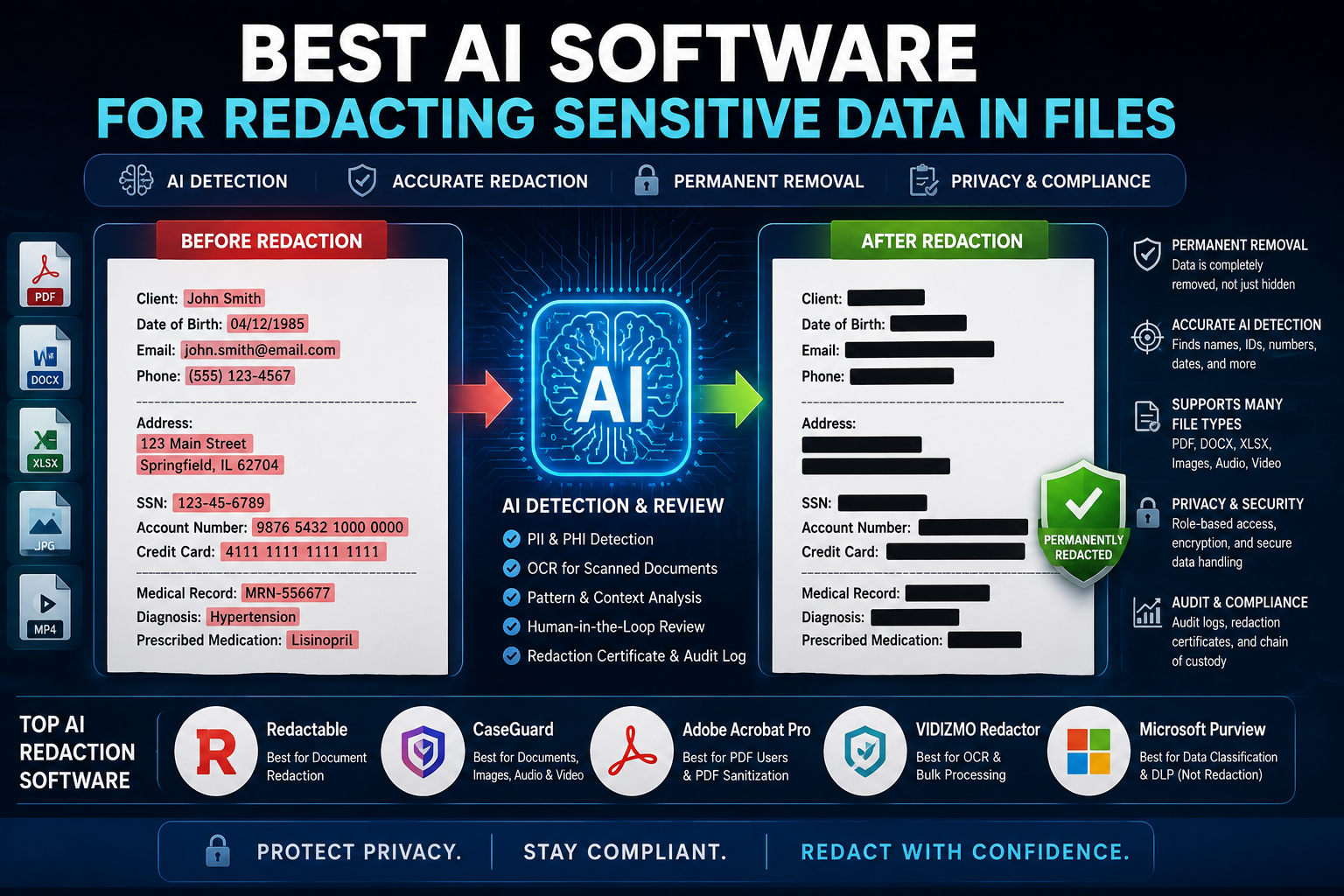
The best AI software for redacting sensitive data in files depends on what you are protecting. For PDF and document-heavy workflows, Redactable is one of the strongest dedicated options. CaseGuard is better for organizations handling documents, images, audio, and video, while Adobe Acrobat is the practical choice for PDF users who want AI-assisted redaction plus reliable PDF sanitization.
AI redaction has changed the workflow from manually searching thousands of pages for names, addresses, account numbers, and other PII to having software identify likely sensitive information automatically. But there is a catch: AI detection is not the same thing as secure redaction.
A tool can correctly find a Social Security number and still leave the original text underneath a black rectangle. It can also miss information inside a scanned page, image, metadata field, or unusual document format.
NIST specifically warns that de-identification is not a single technique and that supposedly de-identified information can sometimes be re-identified. [SOURCE: NIST IR 8053, October 2015]
That is why my selection criteria are simple: detection accuracy, permanent removal, OCR support, privacy controls, auditability, file-type support, and human review.
[IMAGE: AI software scanning a confidential PDF and automatically identifying names, addresses, account numbers, and other sensitive information for redaction]
What is the best AI software for redacting sensitive data in files?
For dedicated document redaction, I would put Redactable at the top of the shortlist, followed by CaseGuard and Adobe Acrobat. The best choice changes if you need to redact video, audio, images, or large mixed-file collections.
My shortlist
1. Redactable — Best dedicated AI document redaction
Redactable focuses specifically on document redaction and uses AI to identify sensitive information such as PII, financial details, and confidential content. It supports automatic detection alongside manual and search-based redaction, followed by human review. [SOURCE: Redactable, September 2026]
2. CaseGuard — Best for mixed file types
CaseGuard is the better fit when your organization handles PDFs and office documents alongside images, audio, and video. Its document workflow includes AI Search, pattern matching, OCR, and templates. [SOURCE: CaseGuard, September 2026]
3. Adobe Acrobat — Best for PDF users
Acrobat Pro provides dedicated PDF redaction and sanitization, while its current AI Assistant can identify and redact sensitive information through natural-language instructions. [SOURCE: Adobe, August 31, 2026]
4. VIDIZMO Redactor — Best for organizations needing AI/OCR workflows
VIDIZMO can automatically detect PII, OCR text, objects, signatures, and custom patterns in documents and create redacted copies. It also supports bulk document processing. [SOURCE: VIDIZMO, September 2026]
5. Microsoft Purview — Best for Microsoft 365 data protection, not traditional redaction
Purview is valuable for discovering, classifying, labeling, and preventing sensitive information from being shared. It should not be confused with a dedicated PDF/document redaction application. Microsoft specifically provides DLP controls that can restrict sensitive files from being uploaded to cloud and AI applications. [SOURCE: Microsoft Learn, August 2026]
What should you look for in AI redaction software?
The most important feature is permanent removal, not simply AI detection. A good redaction platform should identify sensitive content, let a reviewer verify it, permanently remove it, and provide evidence that the operation occurred.
Look for these capabilities:
- AI-based PII detection
- OCR for scanned documents
- Search and pattern matching
- Permanent redaction
- Metadata and hidden-data sanitization
- Human review
- Confidence scores or detection categories
- Redaction certificates or audit logs
- Bulk processing
- API or automation support
- Role-based access controls
- Appropriate data-retention controls
NIST’s guidance makes another useful distinction: removing identifiers does not automatically guarantee that a dataset can no longer be linked to a person. Organizations should evaluate the disclosure risk associated with the specific data and sharing scenario. [SOURCE: NIST SP 800-188, September 2023]
For ordinary document redaction, that means you should ask a basic question before buying anything:
Does the software actually remove the information, or does it merely hide it visually?
Is Redactable the best AI redaction tool for documents?
Redactable is one of the strongest choices when your primary requirement is automated document and PDF redaction.
Its workflow combines AI-based detection with manual redaction, category-based detection, and text search. Redactable also says its workflow provides a redaction certificate documenting the redaction activity. [SOURCE: Redactable, September 2026]
That human-review step matters.
I would not configure any AI redaction system to blindly publish every automatically detected result. Instead, let the AI produce candidates, have a reviewer confirm them, and then finalize the redacted document.
This approach is especially useful for:
- Legal documents
- Contracts
- Financial records
- HR documents
- Customer records
- AI training datasets
- Research files
- Compliance documents
Redactable also specifically markets its workflow for preparing documents and images before AI or machine-learning training. [SOURCE: Redactable, June 18, 2026]
[VERIFY] Vendor claims such as percentage time savings, compliance certifications, and supported file types should be independently verified during procurement rather than treated as guaranteed performance.
Is CaseGuard better for large-scale AI redaction?
CaseGuard is the better option when redaction extends beyond ordinary PDFs and documents.
Its document redaction workflow includes AI Search, OCR, patterns, templates, and traditional search-based redaction. CaseGuard can identify PII such as names, addresses, SSNs, and financial information in document collections. [SOURCE: CaseGuard, September 2026]
Its broader platform also covers video, audio, and image redaction.
That makes CaseGuard particularly interesting for:
- Law enforcement
- Courts
- Government agencies
- Legal teams
- Public-records requests
- Healthcare organizations
- Large e-discovery projects
For scanned PDFs, OCR becomes critical. CaseGuard’s documentation specifically recommends OCR when text is not machine-readable or when documents contain images with text. [SOURCE: CaseGuard, March 2023]
[IMAGE: CaseGuard AI analyzing a scanned PDF with OCR and highlighting detected PII before permanent redaction]
Is Adobe Acrobat good for AI-powered redaction?
Yes, especially if most of your workflow is already based around PDFs.
Adobe Acrobat Pro’s current Redact workflow lets users search for specific words or patterns, mark results, apply redactions, and then sanitize the document to remove hidden information. [SOURCE: Adobe, June 2026]
Adobe has also added AI-assisted redaction through Acrobat AI Assistant. Users can give a natural-language instruction such as asking Acrobat to redact all instances of sensitive information, and the AI can identify matching content before the user confirms the change. [SOURCE: Adobe, August 31, 2026]
The workflow I recommend is:
All tools → Redact a PDF → Redact text and images → Find text and redact → Apply → sanitize hidden information.
Adobe’s current documentation explicitly separates redaction from sanitization. Redaction removes visible sensitive content, while sanitization removes hidden information such as metadata, embedded content, scripts, and other non-visible elements. [SOURCE: Adobe, September 2025]
That distinction is easy to overlook—and it can matter during a legal or compliance review.
[IMAGE: Adobe Acrobat Redact a PDF interface showing AI-assisted detection and the option to sanitize hidden information]
Can AI redact scanned PDFs and images?
Yes, but only if the software has OCR or visual-analysis capabilities capable of processing the file.
A normal text search cannot reliably find information that exists only as pixels inside a scanned document. The application first needs to recognize the text through OCR, then analyze the resulting content for sensitive information.
CaseGuard, for example, provides an OCR workflow specifically for scanned and handwritten PDFs before AI redaction. [SOURCE: CaseGuard, March 2023]
VIDIZMO similarly supports OCR-based detection for documents and scanned PDFs, along with PII and visual-object detection. [SOURCE: VIDIZMO, September 2026]
A good test file should therefore contain both:
- Normal selectable text.
- A scanned page containing the same sensitive information.
If the tool only succeeds on the first one, it is not ready for a serious document-redaction workflow.
How do you safely redact sensitive data with AI?
Use AI as a detection assistant, then verify the results before releasing the file.
A safe workflow looks like this:
1. Classify the information
Before uploading anything, identify what you need to remove.
Examples include:
- Names
- Addresses
- Phone numbers
- Email addresses
- Government IDs
- Bank-account numbers
- Credit-card information
- Medical information
- Internal credentials
- Confidential business information
NIST recommends determining what PII exists and what level of protection is appropriate based on context. [SOURCE: NIST SP 800-122]
2. Check where the file will be processed
This is especially important with cloud-based AI tools.
Before uploading confidential documents, review the provider’s current data-processing, retention, encryption, access-control, and contractual terms.
For highly regulated information, procurement should involve your security and legal teams.
3. Run AI detection
Let the software identify candidate sensitive information.
Don’t immediately export the result.
4. Review every detection
Check both false positives and false negatives.
A name may be correctly detected in one paragraph but missed when it appears inside an image, table, header, or unusual formatting.
5. Apply permanent redaction
Apply the redactions rather than merely placing black shapes over the information.
For PDFs, remove metadata and other hidden content when appropriate. Adobe’s current Acrobat documentation explicitly provides a sanitization step after applying redactions. [SOURCE: Adobe, September 2025]
7. Reopen and test the output
Try searching for the original sensitive values.
Also copy and paste text around the redacted areas and inspect document properties and metadata.
[IMAGE: Secure AI redaction workflow from original document through AI detection, human review, permanent redaction, sanitization, and final verification]
How can you test an AI redaction tool before trusting it?
Build a small test corpus containing known sensitive information and measure misses, false positives, OCR performance, and permanent removal.
Don’t rely on a vendor demo.
Create 20–50 synthetic documents containing:
- Names
- Addresses
- Emails
- Phone numbers
- Account numbers
- IDs
- Dates of birth
- Medical information
- Tables
- Headers and footers
- Scanned pages
- Images containing text
- Deliberately unusual formatting
Then record:
Detection recall: How much sensitive information did it find?
False positives: How much legitimate information did it incorrectly mark?
OCR performance: Did it detect information in scans?
Permanent removal: Can the original information still be extracted?
Auditability: Can you prove who reviewed and finalized the redactions?
This is a better evaluation method than accepting a vendor’s “90% faster” or “99% accurate” marketing number without knowing how the benchmark was constructed.
I have not run a controlled 2026 benchmark across these commercial products, so I would not present a fabricated accuracy ranking as firsthand test data.
What are the biggest mistakes when using AI for redaction?
The biggest mistake is assuming that “AI detected it” means “the document is safe.”
Common failures include:
Using black boxes instead of true redaction
A black rectangle placed over text is not automatically a secure redaction.
The underlying text may remain searchable or extractable.
Forgetting scanned pages
A document can contain both normal text and image-only pages.
Ignoring metadata
Authors, comments, embedded files, scripts, and other hidden content may remain after visible redaction.
Skipping human review
AI systems can miss context-dependent sensitive information.
Uploading confidential files without checking data handling
A redaction tool cannot protect your organization if the original unredacted file is handled in a way that violates your security or privacy requirements.
Treating de-identification as irreversible anonymization
NIST explicitly discusses the possibility of re-identification and recommends evaluating disclosure risk rather than assuming that removing obvious identifiers makes data anonymous. [SOURCE: NIST SP 800-188]
Which AI redaction software should you choose?
For most document-focused teams, start with Redactable. For mixed document, image, audio, and video workloads, choose CaseGuard. For PDF-centric users already invested in Adobe, Acrobat Pro is the practical option.
My recommendations:
Best overall for AI document redaction: Redactable
Best for large mixed-media redaction: CaseGuard
Best for PDF workflows: Adobe Acrobat Pro
Best for OCR and broader media workflows: VIDIZMO Redactor
Best for Microsoft 365 data governance: Microsoft Purview
One important distinction: Microsoft Purview belongs in a data governance and DLP conversation rather than being treated as a direct replacement for dedicated document-redaction software. Its strengths include sensitivity labels, classification, DLP policies, and controlling how sensitive files and information are handled across Microsoft 365 and AI applications. [SOURCE: Microsoft Learn, August 2026]
What is the safest AI redaction workflow?
The safest workflow is AI detection → human review → permanent redaction → sanitization → independent verification.
Don’t let the AI make the final decision by itself.
For sensitive legal, medical, financial, government, or corporate records, keep the original document protected, restrict access to the redaction process, retain an appropriate audit trail, and verify the exported copy before distribution.
NIST’s de-identification guidance supports this risk-based approach: the goal is not merely to make information look anonymous but to reduce the risk that individuals can be identified from the released information. [SOURCE: NIST SP 800-188, 2023]
FAQ: Best AI software for redacting sensitive data
What is the best AI tool for redacting PDFs?
Redactable, CaseGuard, and Adobe Acrobat Pro are strong choices for PDF redaction. Redactable is designed around automated document redaction, CaseGuard adds AI, OCR, patterns, and large-scale workflows, while Acrobat Pro combines AI-assisted identification with established PDF redaction and sanitization features. The best option depends on volume, file types, and compliance requirements.
Can AI automatically remove sensitive information from documents?
Yes, AI can identify and automatically redact many types of sensitive information, including names, addresses, account numbers, and other PII. However, automated detection should be reviewed before release because AI can produce false positives and false negatives. Scanned documents also require OCR or another method capable of analyzing image-based text.
Is AI redaction safe for confidential documents?
It can be, but security depends on how the software processes and stores the original document. Before uploading confidential files, review the provider’s retention, encryption, access, processing, and contractual controls. For regulated data, organizations should validate the specific deployment against their legal and compliance requirements rather than assuming an AI tool is automatically safe.
Can ChatGPT redact sensitive documents?
AI assistants can help identify sensitive information, but confidential files should not be uploaded to an AI service without first understanding its data-handling controls and your organization’s policies. For highly sensitive records, a dedicated redaction system with permanent-removal, review, and audit capabilities is generally the safer workflow.
Does redaction permanently delete the information?
Proper digital redaction should permanently remove the underlying sensitive content from the released file. Simply placing a black shape over text is not sufficient. PDF workflows should also consider hidden information such as metadata and embedded content. Adobe specifically separates permanent redaction from sanitization of hidden PDF data.
What is the difference between redaction and de-identification?
Redaction removes selected information from a document, while de-identification is a broader process intended to reduce the ability to associate data with an individual. NIST emphasizes that de-identification involves multiple techniques and that removing obvious identifiers does not necessarily eliminate re-identification risk.
Final verdict
AI redaction is worth using—but don’t outsource the security decision to the AI.
For a document-heavy organization, I’d start by evaluating Redactable, CaseGuard, and Adobe Acrobat Pro against the same synthetic test set. If you handle multimedia evidence, CaseGuard moves to the front of the list. If your organization lives inside Microsoft 365, add Purview for classification and DLP rather than treating it as your only redaction tool.
The next step is simple: take 20 representative—but non-sensitive—files, run them through your shortlisted tools, and verify that every redaction is genuinely irreversible before trusting the workflow with production data.