Aircrack-ng is the better choice when the goal is active Wi-Fi security testing, while Kismet is stronger for passive wireless discovery, monitoring, packet capture, and intrusion detection. They overlap in wireless reconnaissance, but they solve different problems. For a professional assessment, I would use Kismet for visibility and Aircrack-ng when controlled active testing is authorized.
[SOURCE: Aircrack-ng official documentation, accessed September 2026]
[SOURCE: Kismet official documentation, accessed September 2026]
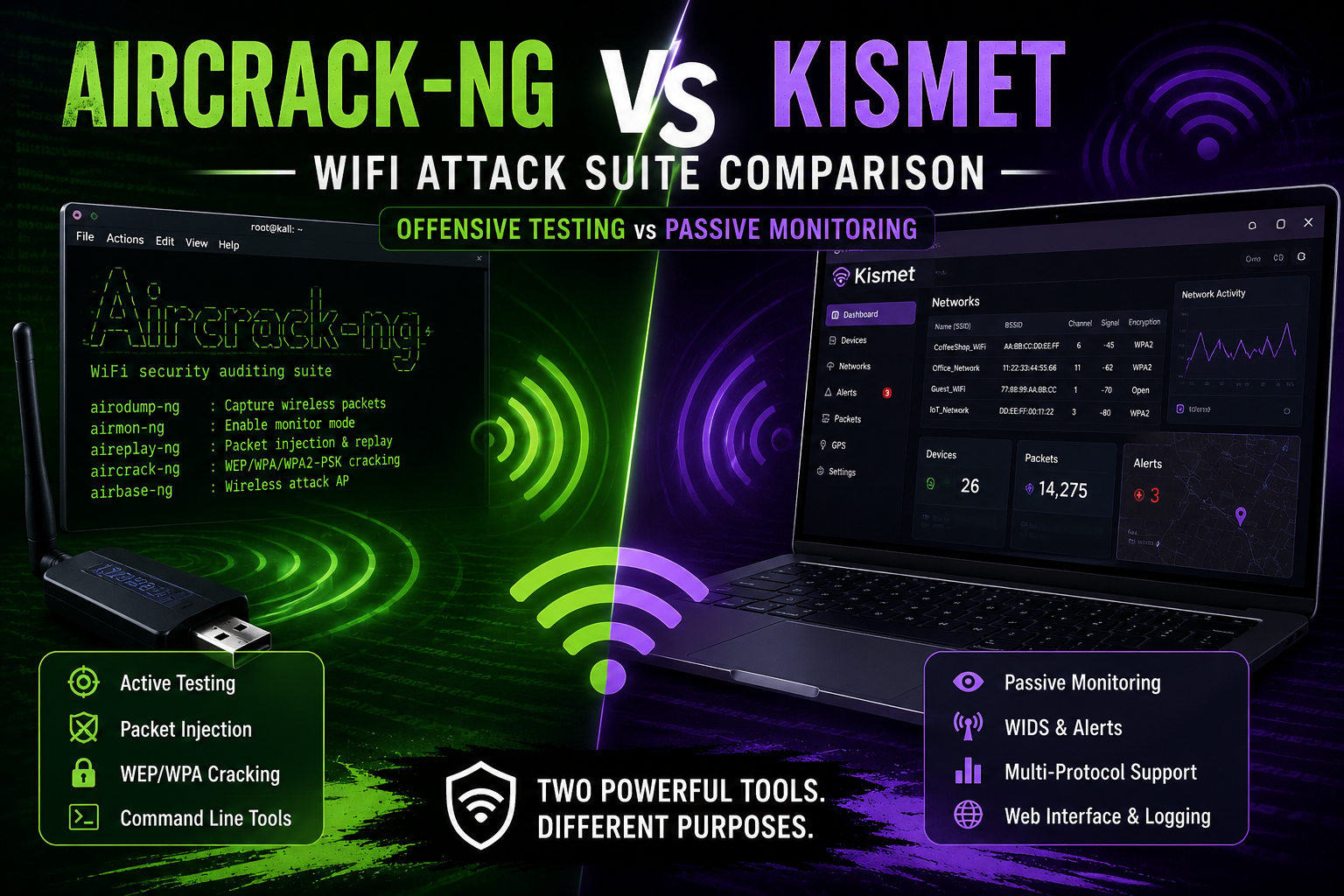
If you’re searching for Aircrack-ng vs Kismet WiFi attack suite, the key distinction is simple: Aircrack-ng is an offensive Wi-Fi auditing suite with tools for monitoring, frame injection, and legacy WEP/WPA-PSK testing, while Kismet is primarily a passive wireless sensor and WIDS platform. The best tool depends on whether you’re trying to test a network’s defenses or understand what is happening around the network.
[IMAGE: Split-screen comparison showing Aircrack-ng command-line tools on one side and Kismet’s wireless monitoring dashboard on the other]
What is the difference between Aircrack-ng and Kismet?
Aircrack-ng focuses on Wi-Fi security assessment and active testing; Kismet focuses on wireless discovery, passive capture, monitoring, and detection. They can both collect wireless information, but their workflows and priorities are very different.
Aircrack-ng describes itself as a complete suite for assessing Wi-Fi security. Its tools cover monitoring, testing wireless-card capabilities, packet capture, frame injection, and WEP/WPA-PSK security testing. The suite is heavily command-line oriented, which makes it useful for scripting and controlled penetration-testing workflows.
Kismet takes a different approach. It describes itself as an open-source sniffer, WIDS, wardriver, and packet-capture system supporting Wi-Fi along with technologies such as Bluetooth, Zigbee, and various SDR-based sources. It can operate headless or through a web-based interface.
That difference matters more than the word “Wi-Fi” appearing in both project descriptions.
Is Aircrack-ng an attack suite or a Wi-Fi scanner?
Aircrack-ng is both a wireless auditing suite and an active-testing toolkit, not simply a Wi-Fi scanner.
The project contains separate utilities for different jobs. For example, airmon-ng handles monitor-mode setup, airodump-ng captures raw 802.11 frames, aircrack-ng performs WEP and WPA/WPA2-PSK key testing, and aireplay-ng provides frame-injection and replay capabilities.
That modular structure is one of Aircrack-ng’s biggest advantages.
A penetration tester can choose only the component required for a particular authorized assessment instead of running a large monitoring platform.
Aircrack-ng’s current official site lists version 1.7 as its available release. [VERIFY: check the official project release page before publication because software versions can change.]
What makes Aircrack-ng useful?
Its strongest areas are:
- Wireless security auditing
- Raw 802.11 packet capture
- Monitor-mode testing
- Wireless-card capability testing
- Controlled frame-injection testing
- WEP security assessment
- WPA/WPA2-PSK auditing
- Command-line automation
One practical advantage is scripting. If your workflow already revolves around Linux shell tools and repeatable penetration-testing procedures, Aircrack-ng fits naturally.
What is Kismet used for?
Kismet is best used for passive wireless discovery, monitoring, packet capture, and wireless intrusion detection rather than as a conventional password-cracking suite.
Kismet can identify wireless devices and networks, collect packet information, maintain records, and generate alerts. Its WIDS functionality can detect suspicious patterns including certain denial-of-service behavior and known wireless attack fingerprints.
It also has a considerably broader data-source architecture.
The official documentation lists Wi-Fi, Bluetooth, Zigbee, SDR-based sources, and other capture sources. That makes Kismet particularly interesting when wireless monitoring is part of a larger sensor platform rather than an isolated penetration test.
Kismet’s current stable release is 2025-09-R1 according to its official download page. [VERIFY: confirm the latest stable release immediately before publishing.]
Which is better for passive Wi-Fi monitoring?
Kismet is the clear winner for passive Wi-Fi monitoring.
Kismet is designed around collecting wireless observations and turning them into useful device and network information. Its web interface, logging system, multiple datasource support, alerts, and APIs make it better suited to continuous monitoring.
For example, Kismet supports PCAP-NG packet streams that can be processed by tools such as Wireshark and Tshark.
This creates a useful workflow:
Kismet → wireless capture → PCAP-NG → Wireshark/Tshark → investigation
That is a very different workflow from an Aircrack-ng assessment focused on testing a specific security control.
[IMAGE: Kismet monitoring workflow from wireless adapter to Kismet database, PCAP-NG and Wireshark]
Which is better for active Wi-Fi security testing?
Aircrack-ng is better when you have explicit authorization to perform active wireless security testing.
The suite includes tools capable of frame injection and replay. Its aireplay-ng documentation, for example, describes packet injection and several testing techniques.
That capability is exactly why Aircrack-ng is powerful—and why it should be restricted to networks and equipment you own or have explicit permission to assess.
A professional wireless assessment might use active testing to answer questions such as:
- Can the authorized test network withstand the intended test?
- Are legacy wireless configurations still enabled?
- Does the wireless adapter support the required assessment mode?
- Are monitoring and detection controls responding to suspicious wireless activity?
- Can security teams distinguish legitimate wireless activity from an attack simulation?
Don’t run active tests against neighboring networks, public Wi-Fi, company networks without authorization, or devices you don’t control.
Aircrack-ng vs Kismet: feature comparison
| Feature | Aircrack-ng | Kismet |
|---|---|---|
| Passive Wi-Fi discovery | Excellent | Excellent |
| Packet capture | Excellent | Excellent |
| Wireless monitoring | Good | Excellent |
| WIDS / alerts | Limited compared with Kismet | Strong |
| Active testing | Strong | Not its primary purpose |
| Frame injection | Yes | Not its primary purpose |
| WEP testing | Yes | No |
| WPA/WPA2-PSK auditing | Yes | Not its primary purpose |
| Web interface | Limited/third-party oriented | Yes |
| Command-line workflow | Excellent | Yes |
| Multiple wireless technologies | Primarily Wi-Fi | Wi-Fi + Bluetooth + Zigbee + others |
| Remote capture | Possible through surrounding tooling | Built-in architecture |
| Best role | Offensive Wi-Fi assessment | Wireless visibility and detection |
The table isn’t saying one project is universally better. They occupy different parts of the wireless-security workflow.
Does Kismet replace Aircrack-ng?
No. Kismet does not replace Aircrack-ng because their primary jobs are different.
Think of Kismet as the wireless visibility and detection layer and Aircrack-ng as a wireless assessment and active-testing toolkit.
A security team may even use both.
For example, Kismet can continuously observe an authorized test environment while a penetration tester uses a separate controlled toolkit to evaluate specific wireless defenses. Kismet can then provide monitoring and alerting context around the test.
This separation is useful because offensive testing and defensive monitoring ask different questions.
Which tool is easier for beginners?
Kismet is generally easier for beginners who want to understand wireless networks because its web interface presents discovered devices and networks visually. Aircrack-ng is better for learners who want to understand wireless penetration testing and Linux command-line workflows.
Kismet’s modern interface reduces the initial barrier to entry. Its documentation also provides configuration files and datasource management through the web UI or configuration files.
Aircrack-ng requires more understanding of wireless interfaces, monitor mode, packet captures, channels, drivers, and the individual tools in the suite.
That steeper learning curve is actually useful if you’re studying penetration testing.
How should you test Aircrack-ng vs Kismet in a legal lab?
Build an isolated wireless lab and compare what each tool can observe rather than testing networks you don’t own.
A simple lab can contain:
- A spare wireless router or dedicated access point.
- A Linux machine with a compatible Wi-Fi adapter.
- One or two test client devices.
- Aircrack-ng 1.7.
- Current Kismet release.
- Wireshark for analyzing authorized captures.
Start with passive observation.
With Kismet, configure your authorized wireless interface as a datasource and observe discovered access points, clients, signal information, packet activity, and alerts. Kismet supports datasource configuration through its web interface, configuration files, or command-line options.
Then use Aircrack-ng’s passive components to examine the same controlled environment.
For example, airodump-ng is designed to capture raw 802.11 frames and can export information in formats including PCAP and Kismet-related formats.
What should you measure?
Don’t focus only on “which tool finds more networks.”
Measure:
- Number of networks discovered
- Number of clients identified
- Capture stability
- Channel visibility
- Signal information
- CPU and memory usage
- Logging quality
- Ease of investigation
- Alerting capability
- Export options
- Ease of automation
[IMAGE: Authorized Wi-Fi laboratory with router, Linux laptop, wireless adapter and two test clients]
A useful comparison
Run both tools against the same isolated lab for the same amount of time.
Then compare the resulting observations.
Kismet’s advantage should become obvious when you need persistent monitoring, structured records, alerts, multiple datasources, and a web interface.
Aircrack-ng’s advantage becomes clearer when the job moves toward command-line wireless auditing and controlled active testing.
Can Kismet detect wireless attacks?
Yes. Kismet can function as a Wireless Intrusion Detection System (WIDS) and generate alerts for certain suspicious wireless behaviors.
Its official documentation describes stateless and stateful fingerprint-based alerts as well as trend-based monitoring. It can also integrate alerts and packet information with external systems through APIs, syslog, and some SIEM tools.
That makes Kismet more attractive to defenders.
For example, a security team can use it as a wireless sensor and investigate suspicious events rather than manually watching packet captures all day.
There is a limitation: Kismet itself warns that WIDS performance is strongest in stationary installations. Mobile/channel-hopping deployments can reduce accuracy and coverage.
Can Aircrack-ng detect wireless attacks?
Aircrack-ng can capture and analyze wireless traffic and is excellent for security testing, but it is not a replacement for a dedicated WIDS such as Kismet.
Aircrack-ng’s design prioritizes individual wireless assessment capabilities rather than continuous defensive monitoring.
For a blue-team deployment, I would choose Kismet first.
For an authorized red-team wireless assessment, I would choose Aircrack-ng when its active testing capabilities match the engagement requirements.
What about Wireshark?
Wireshark complements both tools rather than replacing them.
Kismet can provide PCAP-NG packet streams that Wireshark can analyze, while Aircrack-ng can also produce packet-capture data through tools such as airodump-ng.
A practical toolkit therefore looks like:
Kismet → discovery/monitoring
Aircrack-ng → authorized wireless assessment
Wireshark → detailed packet analysis
That combination gives you much better coverage than trying to force one tool to do everything.
Aircrack-ng vs Kismet: which one should you choose?
Choose Kismet if your priority is:
- Wireless monitoring
- Passive discovery
- WIDS
- Alerts
- Long-running sensors
- PCAP-NG collection
- Web-based investigation
- Multiple wireless technologies
- Defensive security operations
Choose Aircrack-ng if your priority is:
- Wireless penetration testing
- Security auditing
- Command-line workflows
- Wireless adapter testing
- Controlled active testing
- WEP/WPA/WPA2-PSK assessment
- Frame-injection testing in an authorized lab
If you perform both offensive and defensive work, install both. They are complementary rather than direct substitutes.
Common mistakes when comparing Aircrack-ng and Kismet
Treating them as identical tools
They aren’t. Comparing them only by “how many Wi-Fi networks they find” misses their real strengths.
Using old WEP examples as modern Wi-Fi guidance
Aircrack-ng still documents WEP testing because the suite supports legacy security assessment. That does not mean WEP is an appropriate modern security configuration.
NIST’s WLAN guidance emphasizes security throughout the WLAN lifecycle, including configuration and monitoring.
Assuming passive monitoring equals penetration testing
Seeing a network doesn’t mean you’ve tested its security. Passive observation and active assessment answer different questions.
Testing networks without permission
This is the biggest operational mistake. Wireless signals travel beyond physical property boundaries, so an “I can see it” approach is not an authorization model.
Use a dedicated lab, written authorization, or an assessment environment where you have explicit permission.
Frequently Asked Questions
Is Aircrack-ng better than Kismet?
Neither is universally better. Aircrack-ng is stronger for authorized wireless security assessments and active testing, while Kismet is stronger for passive discovery, monitoring, packet capture, and WIDS. Choose Aircrack-ng for offensive assessment workflows and Kismet for wireless visibility and defensive monitoring.
Can Kismet crack Wi-Fi passwords?
Kismet is not designed as a Wi-Fi password-cracking suite. Its primary capabilities include wireless sniffing, discovery, packet capture, monitoring, wardriving, and WIDS functionality. Aircrack-ng specifically includes tools for WEP and WPA/WPA2-PSK key testing, making it the more appropriate choice for authorized password-security assessments.
Is Kismet better for Wi-Fi monitoring?
Yes. Kismet is the stronger choice for continuous Wi-Fi monitoring because it provides device tracking, packet capture, alerts, logging, web-based management, and multiple datasource support. Its WIDS functionality can also identify certain suspicious wireless behaviors and integrate alerts with external monitoring systems.
Is Aircrack-ng still useful in 2026?
Yes. Aircrack-ng remains useful for authorized wireless security assessments, particularly when testers need command-line tools for packet capture, wireless-interface testing, and controlled active testing. The official project currently lists Aircrack-ng 1.7. [VERIFY: confirm the latest release before publication.]
Can you use Kismet and Aircrack-ng together?
Yes. They can complement each other in an authorized lab or assessment. Kismet can provide passive wireless visibility, logging, and alerts, while Aircrack-ng can perform specific wireless-security tests. For packet-level investigation, captures from either workflow can also be examined with Wireshark.
Related reading: Zeek vs Wireshark and network IDS vs host IDS. Browse all our cybersecurity comparisons.
Final Verdict: Aircrack-ng or Kismet?
My pick depends entirely on the job: Kismet for visibility, Aircrack-ng for authorized wireless testing.
If you’re building a defensive wireless-monitoring system, start with Kismet. If you’re learning or performing an authorized Wi-Fi penetration test, learn Aircrack-ng. If you’re serious about wireless security, learn both and understand where each belongs in the assessment lifecycle.
Next step: build an isolated Wi-Fi lab and compare both tools against the same controlled environment. That will teach you far more than a generic “best Wi-Fi hacking tool” list.